Creating a Player Character in Fantasy Grounds, Part 1
The following guide is for use with the D&D 5th Edition ruleset. The screenshots used in this guide were taken with the Wizards of the Coast theme enabled rather than the standard Fantasy Grounds theme; some buttons may vary depending on the theme enabled by your DM. Player Characters (PCs) can be created by the player directly or by the Dungeon Master. If created by the DM, the player can later claim ownership of the character.
Add or Claim a PC
Upon first joining the game, you will see a window of all existing PCs. If your DM has already created your character sheet, you can click on a character to claim it. Characters that you have already claimed will be labeled as owned as seen in the screenshot below. Characters that have been claimed by other characters will will not be visible.
Note: if you previously logged in with a different IP address and claimed the character, it may not be visible to you. The DM can remove ownership so that you may reclaim the character.
If your character hasn’t been created yet, click the add icon in the bottom-left corner of the Character Selection window to launch a new window with a blank character sheet.

Sidebar Setup
By default, the sidebar will be in Play mode, which does not include the options you will need to create your character. Click the Library button in the bottom-right corner of the screen. In the Library window, you can control which buttons are available in the sidebar. Click the Create PC button at the top of the Library window to automatically turn on the appropriate buttons in the sidebar. You may also manually toggle different buttons on and off using this window. The stars on the screenshot below highlight the additional buttons that will be enabled when in the Create PC mode.

Adding Traits & Abilities
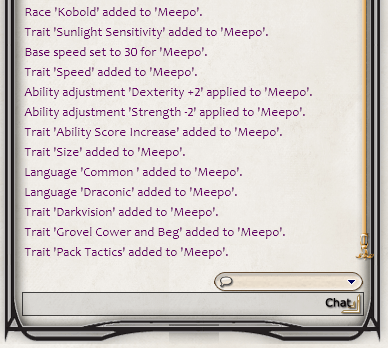
A lot of the character creation is a simple matter of dragging and dropping options from the race/class windows, to your character sheet. For example, by dragging the Kobold race to the main tab of the character sheet, all racial traits are also added. In the screenshot to the right, you can see the chat window which notes the race and all applicable traits that have been added to the new character, Meepo.
Ability scores will also be automatically adjusted when the character race is applied, but you can continue to manually adjust stats as needed.
Stay tuned for more guides on building your character and adding details in to your character sheet in Fantasy Grounds.
 Kandis Hamrick