About my Portfolio
I have years of experience writing user guides and manuals for a suite of software products for my former company. Because the software I previously wrote manuals for is proprietary, I am unable to share samples of the writing the I did in that job.
To give you a taste of my writing, I’ve decided to start writing guides for games and software that I use at home. Hopefully I’ll be able to help out those with shared interests and also give potential employers a taste of my skills and style all in one.
Things I Wish I Knew Before I Started Playing ACNH
Posted on December 6, 2020 Leave a Comment
I was admittedly late to the game when it comes to Animal Crossing. So late, in fact, that it seems odd to be giving advice to new-comers when I thought I was literally the last person to jump on the bandwagon. I also came to Animal Crossing: New Horizons with absolutely NO experience in past Animal Crossing games. There was absolutely a learning curve. So this is a collection of things I wish I’d known when I started and some tips to help you progress your island as quickly as possible.
Things You Can’t Change
- Your Name/Birthday – The game will warn you that you can’t change your name/birthday, which you enter when you first load the game.
- Your Starting Island Layout – You’ll see a series of random island layouts to choose from and they all have roughly the same amount of land/water. You will later unlock the ability to landscape, which will let you adjust the cliff levels and rivers/ponds on your island; however, you cannot change the river mouths. You also can never move the dock, airport, or resident services plaza, so pay attention to where these are more than the landscape when you make your choice.
- Your Airport Color – I know what you might be thinking here: why do I even care what color the airport is? Well, it will dictate the color of some other items that are available to you in your Nook Stop later. Check out this reddit post and infographic for more information on how airport colors impact other item colors. If you don’t like the color, you’ll have to start over to get it to reset. To reset your game, you need to return to the title screen and click the minus button on your left joy-con to open the Settings. This will take you to a screen where you’re talking to Tom Nook; choose to talk to him about “Save data” to delete your save file. You’ll get a warning because once you do this, there’s no going back.
- Native Fruit & Flower – Each island will have a single fruit and flower type that occur natively. You can acquire and plant other fruits and flowers from mystery islands, seeds, or friends. Your native fruit will always be available for purchase in your Nook’s Cranny and will, therefore, sell for less in your shop. These will also be the most common fruits and flowers that you’ll see when visiting mystery islands. Like with the Airport Color, if you don’t like what you get, you’ll need to delete the save file and start over until you get a combo you’re happy with. For example, if I could do it again, I probably would have reset until I got Pears and later set my town tune to the Genovia anthem (little Princess Diaries reference there).
- Your Island Name – You also can’t change your island name which will come slightly later—after you’ve landed on the island and met your starter villagers. I couldn’t think of anything clever, so I just named my island Kandiland (because my name is Kandi—real original, I know). Now I see all these clever island names and I hate mine, but it is what it is.
Basic Controls & Gameplay
The game doesn’t really give you a tutorial of any kind, so if you’ve never played any Animal Crossing games before, you just have to figure a lot out on your own. If you were lucky enough to get your hands on a copy of the official guide book, the controls and basic actions are outlined starting on page 8 (note: I noticed a mistake in how the Y button is labeled in the book). If, however, you were unable to get a copy (like most people), check out this graphic that I put together:

Basic Actions
The (A) button will be your go-to for more actions. Want to go in a building? Press (A) at the door. Want to talk to a villager or NPC? Press (A) while standing near them. Want to use a tool? Press (A) while it’s equipped. Want to smack a building/villager/friend? Press (A) while holding a net next to them! SUCH FUN! Need to harvest some fruit or get some sticks? Press (A) next to a tree to shake it. Just be warned that this could disturb wasps! I recommend always having a Net in hand when you shake trees.
If you want to sit or lay on furniture, just walk into it. In some cases, you can then use the left joystick to change which direction you’re facing. While walking, you can hold (B) to run. Just be careful not to run through flowers because it will destroy the buds and you’ll have to wait for them to regrow. When you see items on the ground, use the (Y) button to pick them up. The (Y) button is also used to kick dirt which can be used to remove designs from the ground or to fill in holes; using the kick option to fill in holes can help save the durability on your shovel! Note that if you have placed custom designs on the ground, it’s easy to kick them up by mistake. If you need to pick up items near custom paths, walk until you see the name of the dropped item on screen to be sure that you don’t kick up your design by mistake.
Money Spot
As you wander your island, you might find a glowing spot on the ground. You can’t do anything with this until you get a shovel. Once you do have a shovel, you can dig it up and get 1,000 bells, but don’t fill in the hole right away. The game doesn’t actually tell you right away what this is and that you can get even more money from it. Bury a bag of bells in the hole to create a money tree that will grow like a fruit tree and give you three bags of bells. There’s a bit of gambling involved here as far as how much you should bury. Below is a table of the odds (according to the official guide book, pg. 124).
| Amount Buried | Result |
|---|---|
| 1,000 bells or less | 100% chance of 1,000 bells x3 |
| 1,001-9,999 bells | 30% chance of amount buried x3 70% change of 1,000 bells x3 |
| 10,000 bells or more | 30% chance of amount buried x3 70% chance of 10,000 bells x3 |
This means you could plant 99k bells, but there’s a 70% chance you’ll lose bells and only get 30k total back. If you plant 10k each time, you’re always guaranteed to get 30k and gain money. If you want to get more and still minimize risk, you can plant 30k each time; sometimes you’ll get lucky and harvest 90k but most of the time you’ll just get the same 30k back again.
How to Best Spend Nook Miles
There are certain items in the game that can only be gained using Nook Miles, the most obvious of these being the Nook Mile Tickets (NMT) that are used to travel to mystery islands. You can also use them to get more hair styles/colors, which might seem like a priority at first, but trust me it’s not. The most annoying problem you’ll run into when you first begin playing, is quick access to your tools and pocket space. To start with, you’ll only get 20 spaces in your pockets and nearly half of that will be used up by tools. The first place you should spend your money is on upgrading your pocket. That will take you to 30. The next upgrade is more expensive and will take you to 40 spaces. I recommend buying the first pocket upgrade and the tool ring first, then the final pocket upgrade.
It’s also worth the Nook Miles to buy the upgraded tools recipes as early as possible. Tools breaking will become very annoying very quickly. Flimsy tools don’t last long and in the beginning you don’t have the extra money to buy tools every time they break so you’ll spend a lot of time crafting tools to use to get the resources you need to craft more tools. It’s an endless cycle.
Crossing Rivers & Reaching Cliffs
You’ll need a pole vault and a ladder to reach all areas of your island and mystery islands that you visit. Unfortunately, you don’t get these tools right away. If you have friends that play, see if they’d be willing to send you these tools so you can take advantage of all the resources on mystery islands. Don’t know anyone who plays? Join our stream and/or discord and let us know. We’ll hook you up.
Talk to Your Villagers
You want to talk to villagers as much as possible for a couple of reasons. First, you’ll build up your friendship levels with them. There are Nook Mile objectives for having “True Friends” status with your villagers. Pay attention to what they say to you, because they will often give you hints about things you can do on the island. For example, the money spot. You might have already found one and potentially filled it in and missed out on a money tree before they mention it, but they may give you similar ideas. Also, they say really silly things sometimes and it’s cute as fuck.

Choosing Villagers
Eventually, Tom Nook will let you purchase additional housing plots for your island so you can recruit more villagers to come live on the island. You should only buy one plot at a time if you’re looking for specific villagers, because if you leave a plot empty overnight, a random villager will be moved in without your approval and you don’t want to end up with some serious nightmare fuel—don’t even get me started on the Octopi villagers. That’s how I ended up with this weirdo and I can’t wait for her to leave:

You can go find villagers a couple of ways. First, if you have friends that play and they have a villager “in boxes,” that means the villager is looking to move off their island and you can invite them to your own. If you search online, you can find threads where people are offering up their villagers that are in boxes. Be aware that some people will ask you for NMTs and/or Bells in exchange and there are some that will try to cheat/scam you. I recommend just looking for people offering villagers up for free.
You can also visit mystery islands to find villagers. Tom Nook will initially prompt you to find 3 new residents which you’ll need to help build furniture for. When I first did this, I just invited the first 3 villagers I found on my mystery islands, not realizing how difficult it’d be to change them later. As long as you have an empty plot, there will be a random villager on each mystery island you visit. Just keep visiting more islands until you find villagers you actually like. Running out of NMTs? Check out giveaway streams or ask for help from friends.
A Note About Dreamies
“Dreamies” are what people call their ideal villagers that they want to keep on their island forever. Some people choose their Dreamies because of how cute they are or for their personality or even because of their houses. The first five villagers on your island—the two that arrive with you and the first 3 you invite—will have very basic houses which aren’t fully themed to the character. All villagers that arrive after that will have their upgraded houses. So if you care about how their house looks, you might want to hold off and not invite a Dreamie as one of your first 5 villagers.
Catching Creatures
You can catch bugs, fish, and sea creatures which can be donated to the museum and/or sold for money. You won’t have a museum right away, but go ahead and start saving anything you catch. Critters can be stored in your house or placed on the island. If you still have just a tent, you won’t have storage yet and once you get your house, you’ll notice the storage fills up fast.
Always donate the first of each creature you catch to the museum so you can complete it faster. You can easily see which critters are already in the museum by checking the Critterpedia app on your NookPhone.

After donating the first of each bug, you can start selling them for bells. You can sell Critters to Nook’s Cranny, but you’ll make even more money if you wait for Flick and CJ to come to your island. Flick will pay double for bugs and CJ will pay double for fish. You can also commission models of bugs or fish to display around your island! You’ll need three of whatever critter you want a model of. You can request bug models while Flick is visiting and fish models while CJ is visiting.
Go ahead and just sell Sea Creatures at Nook’s Cranny. Currently, you can’t get models of them and there are no NPCs that pay extra for them. For more details on how to catch Critters, see our other guides:
- Tips for Catching Fish & Becoming a Cast Master
- Animal Crossing: New Horizons – Wasps!
- Animal Crossing: New Horizons – Scorpions! (also applies to Tarantulas)
Music
There are different items in the game that can be used to play music. By default, you’ll get a Portable Radio, which plays K.K. Slider songs at random. Other items will let you register and play specific songs, or shuffle your music library. Music can be purchased through the Nook Shopping app at the Nook Stop in Resident Services. Each day, different music will be available.
After you progress through the main storyline, K.K. Slider will come to your island for a concert and will then show up every weekend. During concerts, you can request songs from K.K. Requests can be random, by mood, or by title. There are some songs that you can only get by requesting it specifically by title!
In your pocket, songs will show up as a music note. While in your house, you will see an option to “Hang on Wall” which will display the album cover as wall art, but this doesn’t add it to your music library. Approach an item used to play music (Jukebox, Tape Deck, Phonograph, etc) and choose the “Register” option. Choose music from your pocket and it will be added to your library. You can remove it later if you don’t like it and don’t want it to play. Use the plus/minus (+/-) buttons to adjust the volume and choose which song you want to listen to. You can also set it to shuffle through your entire library.
Creating a Player Character in Fantasy Grounds, Part 1
Posted on August 26, 2020 Leave a Comment
The following guide is for use with the D&D 5th Edition ruleset. The screenshots used in this guide were taken with the Wizards of the Coast theme enabled rather than the standard Fantasy Grounds theme; some buttons may vary depending on the theme enabled by your DM. Player Characters (PCs) can be created by the player directly or by the Dungeon Master. If created by the DM, the player can later claim ownership of the character.
Add or Claim a PC
Upon first joining the game, you will see a window of all existing PCs. If your DM has already created your character sheet, you can click on a character to claim it. Characters that you have already claimed will be labeled as owned as seen in the screenshot below. Characters that have been claimed by other characters will will not be visible.
Note: if you previously logged in with a different IP address and claimed the character, it may not be visible to you. The DM can remove ownership so that you may reclaim the character.
If your character hasn’t been created yet, click the add icon in the bottom-left corner of the Character Selection window to launch a new window with a blank character sheet.

Sidebar Setup
By default, the sidebar will be in Play mode, which does not include the options you will need to create your character. Click the Library button in the bottom-right corner of the screen. In the Library window, you can control which buttons are available in the sidebar. Click the Create PC button at the top of the Library window to automatically turn on the appropriate buttons in the sidebar. You may also manually toggle different buttons on and off using this window. The stars on the screenshot below highlight the additional buttons that will be enabled when in the Create PC mode.

Adding Traits & Abilities
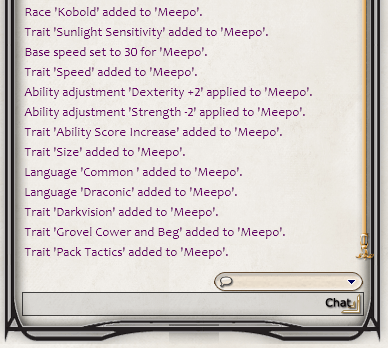
A lot of the character creation is a simple matter of dragging and dropping options from the race/class windows, to your character sheet. For example, by dragging the Kobold race to the main tab of the character sheet, all racial traits are also added. In the screenshot to the right, you can see the chat window which notes the race and all applicable traits that have been added to the new character, Meepo.
Ability scores will also be automatically adjusted when the character race is applied, but you can continue to manually adjust stats as needed.
Stay tuned for more guides on building your character and adding details in to your character sheet in Fantasy Grounds.
Quick Start Guide for Adding New Residents to Your Island in ACNH
Posted on August 26, 2020 Leave a Comment
Much to the disappointment of many families with a shared Nintendo Switch, all accounts on the Switch share a single island in Animal Crossing: New Horizons. While this can be a huge drawback for multi-user Switches and can lead to some strained relationships, it can be super useful for a single user!
After playing for a couple of months, I was seriously running out of space on my island. I had so many ideas about spaces I wanted to stage, but couldn’t find the room to do it. I wanted a cafe, playground, fitness center, tiki bar/surf shop, and a Renaissance Festival complete with castle. And much, much more.
I had already created a second account to get more storage space for my hoard of items and clothing and crafting materials. Then I decided that I could use the rooms of his house to set up a nice spa in my zen garden area. Which gave me the idea to add more residents in order to move some of my outdoor areas inside. Not only has this given me more space for gardens and greenery, it also gives me more options for decorating because you can use flooring/wallpapers and hang items on walls.
Starting a new house can be an expensive endeavor. You can drop bells from your main account for paying the loans, but the moving fees have to be paid in miles by each account. The guide below will help you quickly accrue the 5,000 miles you need to to pay off your moving fees.
From Your Main Account
Make your new resident’s life easier.
Before you log out of your main account and start the new one, do yourself a favor and drop some supplies, especially tools–possibly some items to sell as well if you’ve already gathered everything in your daily rounds on your main account.
They’ll earn miles for trashing tools, so you may want to just leave them some flimsy tools. They’ll learn how to make the flimsy fishing rod pretty early, but they won’t learn all the tools up front.
Additionally, you may want to start up the new account before doing your daily tasks so that it leaves more for them to do. Such as shaking items from trees (Shady Shakedown) and digging up fossils.
Setting up the New Resident’s Info
If you’re setting up a new resident for your own use, rather than a character name, name them based on what their house will be used for. For example, the first new residents I added for this purpose were “University” and “Library.” Flurpy decided to turn her extra residents into a shopping center and in the video referenced later, set up a character named “Food Court.”
Set the resident’s birthday to the day AFTER you’re setting them up. Birthday celebrations only happen after you have a house AND you’ve spoken to at least one animal resident on the island. The birthday celebration gets you 2,000 miles. It won’t help you with paying your moving fees, but it will help you upgrade the resident’s pocket space, tool ring, etc. And trust me, it’s really annoying to go back to no tool ring and only 20 pocket spaces once you’re used to the max. I can’t tell you how many times I hit the up arrow on the d-pad trying to use the tool ring just out of sheer habit.
Earning Miles Fast
If you’re a brand new user starting your own island, we’re working on a separate guide and will update this with a link once it’s done. Some of this might be helpful, but some of this won’t be available on a brand new island.
At the end of this post, you’ll find a table with all of the achievements for Nook Miles that are easy to rack up for a new resident. But first, here’s an outline of our speedruns and the order we did things in to do this as quickly as possible. We completed these in 30 minutes or less.
Lady Dynamo’s Speedrun
My tactic for big miles early on was planting fruit trees. I started this resident on a day I had fruit but hadn’t yet harvested. Alternatively, make sure to just drop one of each fruit for your new resident to plant. If you don’t have space to really plant more trees, just dig them up and sell them immediately, which will also trigger the Seller of Unwanted Stuff achievement. Planting one of each fruit tree gets you a total of 2,800 miles!
| Miles Gained | Achievement | Description | Total Miles |
|---|---|---|---|
| +500 | Kandiland Miles! | Automatically unlocked by moving to your island. | 500 |
| +300 | Bulletin Board Benefit | Write your first post on the Bulletin Board. | 500 |
| +300 | Island Shutterbug | Open the Camera app on your NookPhone and take a picture. | 1100 |
| +300 | Edit Credit | Open the Passport app on your NookPhone and edit any part of your passport. | 1400 |
| +100 | Fruit Roots 1 | Planted a Coconut (order of fruit doesn’t matter). | 1500 |
| +200 | Fruit Roots 2 | Planted a Peach (order of fruit doesn’t matter). | 1700 |
| +300 | Fruit Roots 3 | Planted an Orange (order of fruit doesn’t matter). | 2000 |
| +500 | Fruit Roots 4 | Planted a Cherry (order of fruit doesn’t matter). | 2500 |
| +700 | Fruit Roots 5 | Planted a Pear (order of fruit doesn’t matter). | 3200 |
| +300 | NookPhone Life | Open your NookPhone for the 10th time. | 3500 |
| +1000 | Fruit Roots 6 | Planted an Apple (order of fruit doesn’t matter). | 4500 |
| +300 | Go Ahead. Be Shellfish! | Sell 10 seashells (any kind). | 4800 |
| +300 | Seller of Unwanted Stuff | Sell anything for the first time (triggered along with Go Ahead. Be Shellfish! achievement). | 5100 |
Flurpy’s Speedrun
Flurpy forgot to drop tools and was distracted by chat and STILL paid her moving fees in under 30 minutes! She took advantage of the “Your Island Name” Icons achievement by changing her island tune and flag for a quick 1,000 miles! She also took advantage of the Fruit Roots miles, but instead of looking for actual free space on her island, she dug each tree up immediately and used the same hole for the next fruit tree for added efficiency! Here’s the order she earned miles, but you can also just watch this sweet video.
| Miles Gained | Achievement | description | total miles |
|---|---|---|---|
| +500 | Toebean Miles! | Automatically unlocked by moving to your island. | 500 |
| +300 | Island Shutterbug | Open the Camera app on your NookPhone and take a picture. | 800 |
| +300 | Edit Credit | Open the Passport app on your NookPhone and edit any part of your passport. | 1100 |
| +300 | Bulletin Board Benefit | Write your first post on the Bulletin Board. | 1400 |
| +500 | Toebean Icons 1 | Change your island tune! You have to change at least one note, but then you can just change it back if you like your current tune! | 1900 |
| +500 | Toebean Icons 2 | Change your island flag! You can even choose the same design you’re already using! | 2400 |
| +300 | Go Ahead. Be Shellfish! | Sell 10 seashells. | 2700 |
| +300 | Seller of Unwanted Stuff | Sell anything for the first time (triggered along with Go Ahead. Be Shellfish! achievement). | 3000 |
| +100 | Fruit Roots 1 | Planted a Pear (order of fruit doesn’t matter). | 3100 |
| +200 | Fruit Roots 2 | Planted a Peach (order of fruit doesn’t matter). | 3300 |
| +300 | Fruit Roots 3 | Planted an Orange (order of fruit doesn’t matter). | 3600 |
| +500 | Fruit Roots 4 | Planted a Cherry (order of fruit doesn’t matter). | 4100 |
| +700 | Fruit Roots 5 | Planted an Apple (order of fruit doesn’t matter). | 4800 |
| +1000 | Fruit Roots 6 | Planted a Coconut (order of fruit doesn’t matter). | 5800 |
Full List of Quick & Easy Ways to Earn Miles
The table below includes the Nook Miles achievements we used as well as others that can be quickly and easily earned. These are pulled directly from the official ACNH Guide. The list below is sorted from tasks worth the most miles to those worth the least to help you prioritize tasks.
You’ll automatically get 500 miles just for moving to the island thanks to the “Your Island Name” Miles! achievement. Since this happens automatically, we didn’t include it in the list below.
| # of Miles | Achievement | description |
|---|---|---|
| 11,800* | Golden Milestone | *11,800 miles total (300, 500, 1000, 2000, 3000, 5000) Acquire your first Golden tools of each type (Net, Fishing Rod, Watering Can, Axe, Shovel, Slingshot); miles increase for each tool, but the order doesn’t matter. If you have access to all the golden tools, this is a great way to rack up miles quickly. The resident doesn’t need to keep–or even use–the tools, they just need to pick them up and drop them! |
| 2,800* | Fruit Roots | *2,800 miles total (100, 200, 300, 500, 700, 1000) Plant one of each type of fruit tree. The number of miles increases exponentially for each different fruit tree. You get the miles as soon as the trees are planted so you don’t have to keep them if you’re short on space! |
| 2,000* | Happy Birthday! | *Can only be earned after you have a house so it won’t help with your moving fees. Play on your birthday! Set the new character’s birthday to the day after you start playing them to quickly earn miles for pocket and tool ring upgrades! |
| 1,000* | “Your Island Name” Icons | *500 miles each Change your island flag and/or tune! You must change at least one note of the tune, but can immediately change it back. When changing the flag, you can choose the same design you’re already using. |
| 500 | Making a Change | Use a wardrobe to change clothes. |
| 500 | Rock-splitting champ | Hit a single rock 8 times in a row. Every resident gets a money rock, so even if you’ve already hit your rocks for the day, the new resident should have at least one they can hit! |
| 300 | Angling for Perfection | Catch 10 of any fish. |
| 300 | Bona Fide Bone Finder | Dig up 1 fossil (as long as you haven’t dug up and identified your fossils for the day already). |
| 300 | Bulleting Board Benefit | Write your first post on the bulletin board. |
| 300 | Cast Master | Catch 10 fish in a row. If you don’t lose any fish, you’ll get this at the same time as Angling for Perfection! |
| 300 | Edit Credit | Open the NookPhone app and edit your passport for the first time. |
| 300 | Flower Power | Plant 10 flowers. If you have the seeds and the space, this is quick and easy. |
| 300 | Flower Tender | Water 10 flowers. If it’s raining or if other residents have already watered the flowers, this may not work. |
| 300 | Go Ahead. Be Shellfish! | Sell 10 seashells of any kind. Bonus: this will also trigger the Seller of Unwanted Stuff achievement! |
| 300 | Island Togetherness | Talk to all of your residents. If you have a full 10 residents, it can potentially be time consuming to track them all down. |
| 300 | Island Shutterbug | Open the Camera app on your NookPhone and take a picture for the first time. |
| 300 | NookPhone Life | Open your NookPhone for the 10th time. If you open your phone each time you get the alert that you’ve earned miles, you’ll passively get to this in no time. |
| 300 | Overcoming Pitfalls | Fall into a pit trap. If you have the Pitfall seed DIY, bury one before you log out of your main account. |
| 300 | Seller of Unwanted Stuff | Sell anything for the first time. |
| 300 | Shady Shakedown | Shake furniture from a tree (as long as you haven’t already done so with your main account already). |
| 300 | Shop to It | Order something from the Nook Shopping app in the ABD inside Resident Services. |
| 300 | Taking the Sting Out | Get stung twice by wasps and faint. |
| 300 | Trashed Tools | Trash 1 tool (flimsy net and flimsy fishing rod only break after catching 10 fish/bugs so you’ll get this at the same time as Angling for Perfection or You’ve got the Bug if you go use a flimsy tool). |
| 300 | You’ve Got the Bug | Catch any 10 bugs. |
 Kandis Hamrick